Updated:
Added Whisper Dialogs (BIG BIG HELP FROM err0r AND Ozzy10)
made a Auto Join
Added my MP3 Player
A TG007 community discussion started by Ozzy10.

Updated:
Added Whisper Dialogs (BIG BIG HELP FROM err0r AND Ozzy10)
made a Auto Join
Added my MP3 Player
Spam Honeypot - http://www.haggistech.co.uk/honey(humans do not register)
looking better with each screenshot haggis.. keep up the good work.
Am getting right back into scripting now lol
still got a few probs wi whisper box but i think i am getting it
Spam Honeypot - http://www.haggistech.co.uk/honey(humans do not register)
Very nice dude
Pomperom
Making a new mp3 Player

Spam Honeypot - http://www.haggistech.co.uk/honey(humans do not register)
Update here is all the dialogs now

Spam Honeypot - http://www.haggistech.co.uk/honey(humans do not register)
Looking better all the time, Haggis
A couple of comments/questions:
Not sure about the buttons on the Mp3 player being displayed that way. I can see you've got space restrictions but there could be a better way (imo) to align them.
For your chat options dialog - does it only set the font for on input events or are all fonts the same after choosing one?
Keep up the great work, I look forward to seeing how your script evolves
Get the Tech outta here!
Yeah am prob gonna ditch the mp3 player and stick with my old one lol
The fonts are only on input
i though about addingh html chat screen so i could do them on text aswell
might try that sometime
i have almost finished the control dialog now

Spam Honeypot - http://www.haggistech.co.uk/honey(humans do not register)
No no no. Don't ditch the mp3 player, it's fine - just could do with a dialog redesign. I also think you could use better icons in your set-up dialog.
Not trying to flame or be critical, just offering my two cents for what it's worth.
Keep up the great work
Get the Tech outta here!
yeah i was just using the dllto grab icons from windows until i make icons for it
Spam Honeypot - http://www.haggistech.co.uk/honey(humans do not register)
Thought i would do a few updates to pr0metheus this weekend.
The mode changer is disabled as i'm not an op in the active channel.. they are enabled if I am an op in the active room. The little fire icon at bottom right hides mode changer and displays other info.. nickname, server, other options, etc.

top bar looks sweet, i like the way the buttons blend in with the background
Not much done just added Hard drive and memory bars

Spam Honeypot - http://www.haggistech.co.uk/honey(humans do not register)
lol the master w00 listens to Metallica =p Nice Haggis Nice err0r indeed ozzy10 as well keep up the good work =d I was going to post mine but I don't like the bad comments that I get
its just a test , going to see what can be done with virc

thats what i was saying in the screeny but thanks for the info
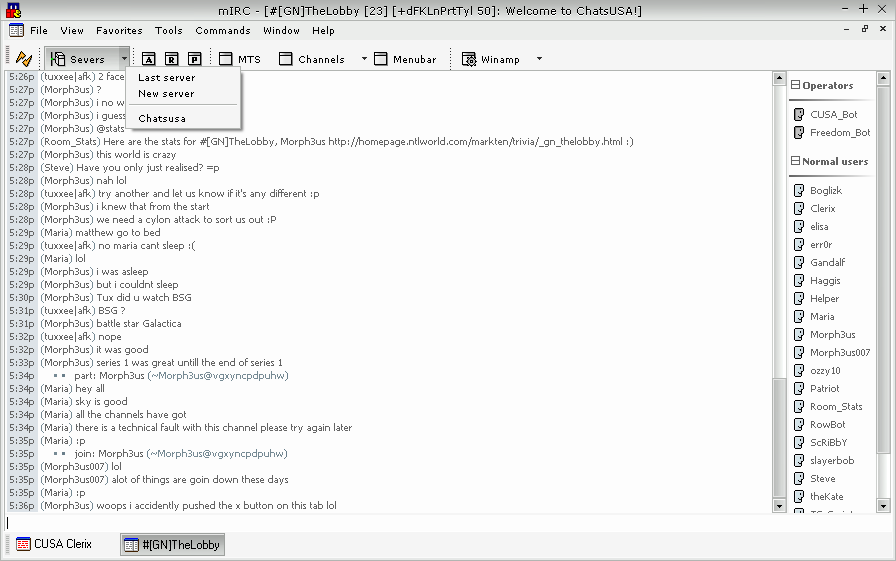
I decided to do a lil work on my personal script. It's not a lot but it's enough. I might decide to delete the connect button and just use the servers popup but it's easy as is.
The A, R and P buttons are Aliases, Remotes and Popups respectively. The next three are dialogs, followed by a few commands for winamp (open file/dir, play/stop, seek, volume & spam).
looks good, need a lil more color though
Sign in to reply or start a new topic where your account has permission.