Skip to content
General IRCX

Don't Know If That's The Proper Section, But Well..

A TG007 community discussion started by [::X-System::].

Discussion 14 posts
Page 1 of 1
Open
Topic #8836 · 14 published posts · 4,392 views

Um, i was wondering if there is any irs scripts compiler other than mIRC


And i mean something more simple. More like a notepad file that compiles the code and displays it the same way mIRC does with all the { } 's and stuff.


Highlighting the code with colors would be great too, something like;

untitledcw2.jpg

on me:*:join:#:hop #

based on what i've seen here and there, people have made tools to modify the mirc's editor, to allow for that. I'm not too sure if it has been released, i've seen screenshots from mircscripts on it. So you may be best to check there, see if there is anything that you may be able to use. Though i wouldn't be able to help you much more.

The main point is not to highlight mirc'c script editor. It's finding a simpler/smaller compiler for the irc codes


My supervisors at work freak out on seeing mIRC lol some actually consider mIRC a trojanhole or a hacktool, it's why i need something like a notpad, or any irc scripts compiler that doesn't look like mIRC

on me:*:join:#:hop #

well for one, the term is "trojan horse", not trojanhole.


As for an editor, you could try Notepad++. It is real sweet program, but it doesn't have a direct link to mIRC language support, but i believe you can make them yourself. Get Notepad++ at http://notepad-plus.sourceforge.net/uk/site.htm. Have fun.

Edited Aug 20, 2007 8:28 AM by The Gate Keeper

Um, i was wondering if there is any irs scripts compiler other than mIRC


And i mean something more simple. More like a notepad file that compiles the code and displays it the same way mIRC does with all the { } 's and stuff.

Highlighting the code with colors would be great too, something like;

untitledcw2.jpg


You can use phoenix editor, it's an editor for mirc code with syntaxique colors like tagx, i don't know if you search that's sort of thing.

if it's that sort of think, i can give you the link in order to download it .

well for one, the term is "trojan horse", not trojanhole.


As for an editor, you could try Notepad++. It is real sweet program, but it doesn't have a direct link to mIRC language support, but i believe you can make them yourself. Get Notepad++ at http://notepad-plus.sourceforge.net/uk/site.htm. Have fun.


The Notepad i good, but it doesn't do the job of mirc's { } button


And sure Orus, i'd love to try it :)

on me:*:join:#:hop #

The Notepad i good, but it doesn't do the job of mirc's { } button

And sure Orus, i'd love to try it :)


Here you are, but a little pb, i don't know if it's release in english... .

http://www.scriptsdb.org/download.php?id=609

maybe they freek out because your ment to be working , NOT coding for mirc

My code does NOT have bugs. It just develops random features.

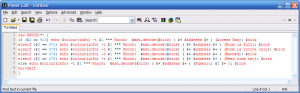
the best program for php,html,css, etc etc. I use it for mirc as well.


Download PowerEdit
post-20793-1187636749_thumb.png

Edited Aug 20, 2007 7:06 PM by err0r

Get information about ircWx here

Attachments 1 file

looks cool err0r lol. Not sure why you would want to code mIRC at work though? :P Unless you're getting paid to do that then I suppose lol..

err0r: 666 + 1337 = 2003 backwards is 3002 which is how many people ozzy has banned from tg
err0r: spooky

maybe they freek out because your ment to be working , NOT coding for mirc

i get bored real FAST :\


Ty Orus, i like it but sadly, i suck at french -.-

& ty err0r, i'll try it

Edited Aug 21, 2007 9:55 AM by [::X-System::]

on me:*:join:#:hop #

Ok..

i tried all what's mentioned above, some highlight the code pretty cool, but NONE aligns the code lines the same way mirc does, wich - for me at least - is way more important than highlighting the lines with colors

on me:*:join:#:hop #

Ok i finally got something that could be very useful, it was originally built for mirc, and it doesn't just highlight, it checks for brackets' errors aswell (note the { } button on the top right) but - as usual - it doesn't align the codelines like mirc does -.-

thanks to hixxy for the link


mEditor

and there's the screenshot:

2161.png

on me:*:join:#:hop #

but - as usual - it doesn't align the codelines like mirc does -.-


What do you mean?


a {

b {

c

}

}


Becomes:


a {
  b {
    c
  }
}


When you hit the "{ }" button. What else are you talking about? :unsure: