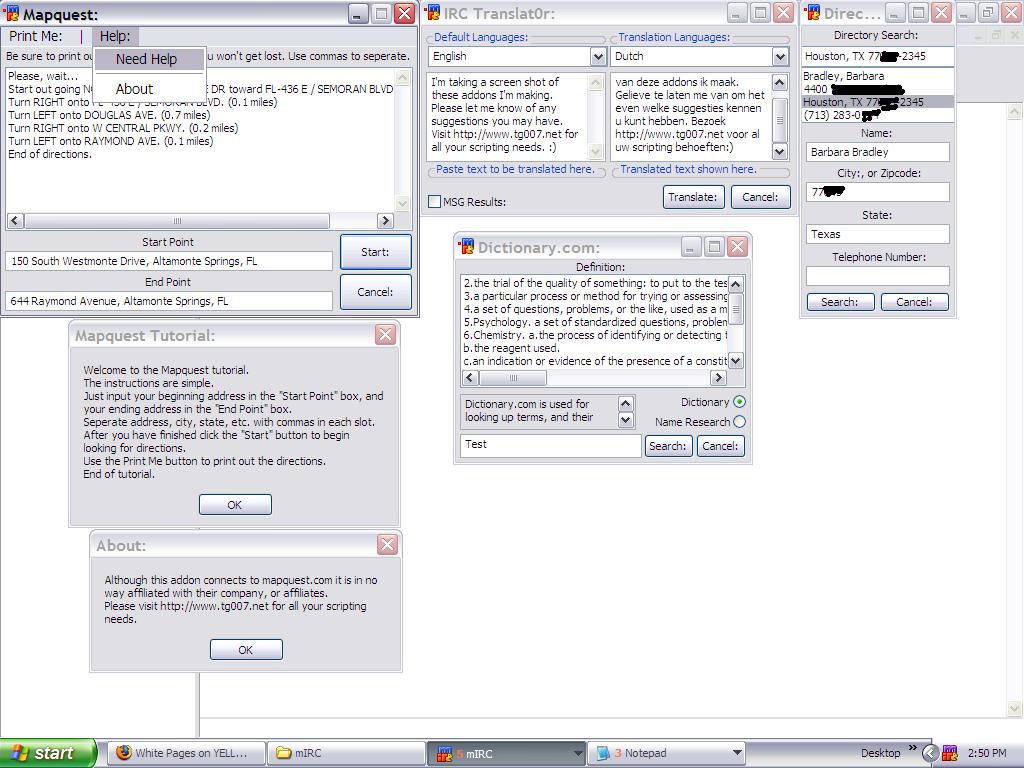
Happy Thanksgiving, everyone. Here is a screen shot of some addons I'm making currently. Let me know if you can think of any improvements. 

A TG007 community discussion started by Warrior124.

That looks good. Dialog = 
Looks good warrior , only 1 problem.
The translation of the english text is dutch not german 

might want to sort out your av too , as the windows protection center is showing an alert
My code does NOT have bugs. It just develops random features.

looks good so far
Get information about ircWx here
Nice good addon! But is this translation tool going to be 100% accurate grammar-wise? A lot of times most online translation sties return the translated text wrong or in an incorrect meaning, which in the eyes of a native-speaking person, he or she can obviously tell if an individual is using an online translator or not.
Most won't return 100% They confuse words and/or phrases and sentences, and return incorrect responses.

Personally, I would recommend using two drop-down boxes for the language dialog rather than loads of radio buttons; makes it look neater, takes up less space, easier to code and it doesn't take much to add any other languages.
The directory listing dialog looks a bit large for what it is. Are there items that will fill up all of the space?
The map quest dialog buttons are a bit over-sized imo and the colons seem unnecessary. Would be nice to see an interactive graphic for the map too Does it make suggestions for incorrectly-spelled places (or multiple places with the same name) or look up local public places (eg: restaurants)?
Looks like they're getting along well.
I don't get paid to know the answer, therefore I'm far more likely to give you a straight and honest answer.
Warrior, I think it's usually a good idea to list multiple definitions starting at 1. Also, in regards to the definitions dialog, you're small statement area is gramatically incorrect; you generally do not precede "and" with a comma.
For the IRC Translator I don't see why you've used group boxes instead of text and I don't think you should have a colon after the checkbox's text. The two drop-down boxes are also no aligned to the text boxes.
The directory dialog doesn't really need a title; if the title doesn't fit on the dialog then there's no real point in having a (long) title. I would suggest having the text to the left of the text boxes, as opposed to having them above the text boxes.
The two buttons on the mapquest dialog are not aligned and they're a bit over-sized; making the buttons the same height as the text boxes would look neater imo, like the dictionary dialog.
Also, why are there colons on most of the buttons and the toolbar? They don't really seem to fit.
I don't get paid to know the answer, therefore I'm far more likely to give you a straight and honest answer.
Warrior, I think it's usually a good idea to list multiple definitions starting at 1. Also, in regards to the definitions dialog, you're small statement area is gramatically incorrect; you generally do not precede "and" with a comma.For the IRC Translator I don't see why you've used group boxes instead of text and I don't think you should have a colon after the checkbox's text. The two drop-down boxes are also no aligned to the text boxes.
The directory dialog doesn't really need a title; if the title doesn't fit on the dialog then there's no real point in having a (long) title. I would suggest having the text to the left of the text boxes, as opposed to having them above the text boxes.
The two buttons on the mapquest dialog are not aligned and they're a bit over-sized; making the buttons the same height as the text boxes would look neater imo, like the dictionary dialog.
Also, why are there colons on most of the buttons and the toolbar? They don't really seem to fit.
takaharu, concerning the multiple definitions starting at 2 well you will need to talk to the ones who has the website about that, lol. For some odd reason that is how it is displayed in the source code.
Concerning the grammar, I may have not been in school for quite some time, but I seem to remember you use commas along with and, or, but, etc so that you can form two sentences into one sentence.
Concerning the colons I just added them in so that it looks a little more proffesional. At least it does to me, lol.
I think it is a good idea concerning the directory dialog to eliminate the title.
I see what you mean about the drop down boxes, and the buttons on the mapquest dialog, and they will be fixed before the release. I made the buttons oversized on mapquest, because I don't like to have too much unused space on my dialogs. To me, unused space gives me the crepes, lol. I'll try to think of something to add, and make the buttons smaller.
Not to be anal or a stickler .. I mean you design your stuff however you like as long as you are having fun! But and doesn't get a comma. *shrugs* Keep up the good work. If you ever want to put emoticons in my connections let me know!! People ask for it.
Not to be anal or a stickler .. I mean you design your stuff however you like as long as you are having fun! But and doesn't get a comma. *shrugs* Keep up the good work. If you ever want to put emoticons in my connections let me know!! People ask for it.
lol, you both have forced me to look up others who puts commas before "and". Here is one example. It asks which is the best answer for combining two sentences into one, and shows the best answer is answer "D" which has ", and" in it to form two sentences into one. So, time for you two to go back to school, lol. Just kidding. 
P.S.: Thanks for the invite concerning the emots. I recently had to delete everything from my pc, and start fresh, because of something my brother did that caused me to not be able to boot up, lol. I'll redownload your connection, and make an emot script for it.
Commas don't have bounds. It determines a pause in your sentence instead of having to use a period everytime. FYI.
I can type like this. However, it's better and correct English grammar to use commas.
I can type like this, however, it's better and correct English grammar to use commas.
Sign in to reply or start a new topic where your account has permission.