Skip to content
Screenshots

Mp3 Player Screenshot

A TG007 community discussion started by err0r.

Discussion 8 posts
Page 1 of 1
Open
Topic #10569 · 8 published posts · 3,520 views

I knocked the dust off our old mp3 player.. gave it a newer look and updated some of the options.


Options:


Trackbar ( change with color picker )

Playlist/input boxes and text change colors with color picker

Spam Editor (open and close)

Playlist open/close

Shuffle or play in order

Spam choices, no spam, echo -a, spam selected chans, spam all chans

Volume control including mute

Scrolling now playing info box

Play single song or all songs

etc
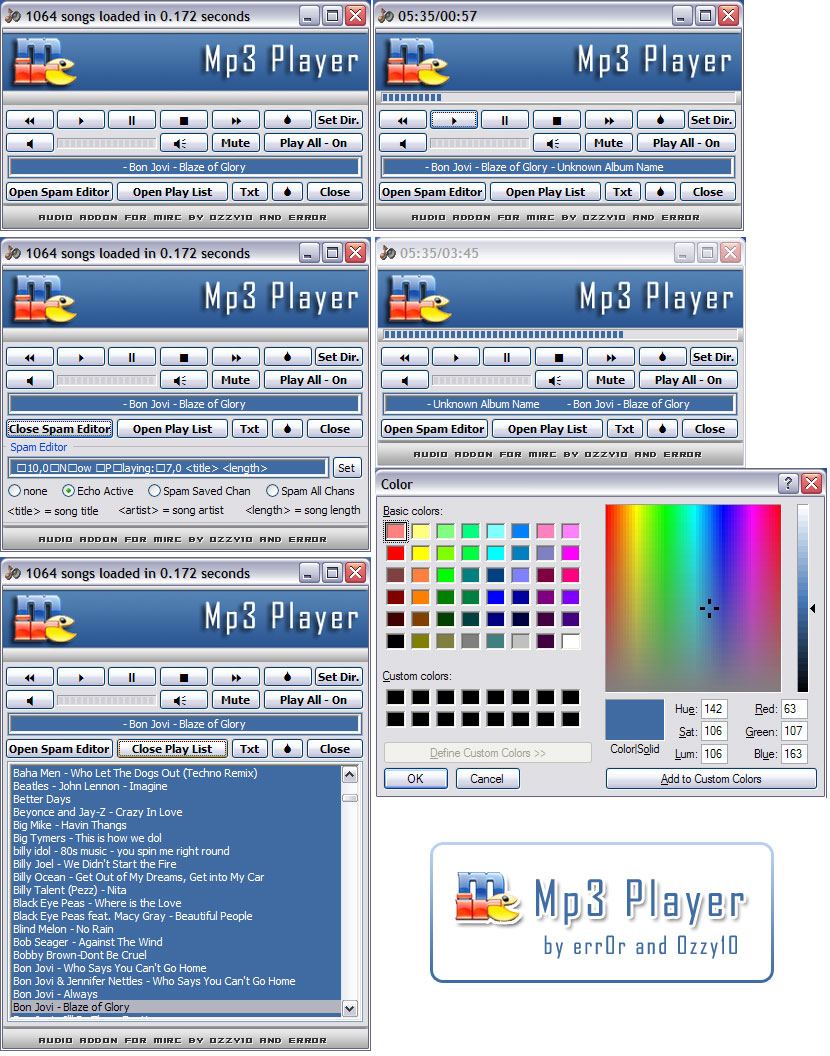
 

post-20793-1217216500_thumb.jpg


I had fmod.dll installed but really didn't care for it much. I might try it again in the future.

Todo: Playlist manager

Edited Jul 28, 2008 3:46 AM by err0r

Get information about ircWx here

Attachments 1 file

Looks great, err0r. One thing I would say, and I say it a lot, is lose the large banner at the top of the player (I suspect this is where you had the fmod.dll control?).


It looks clean, and has the sort of GUI I like to see & use.

i plan on removing the banner or at least making it smaller but in order to do so i have to change a lot of sizing issues for opening and closing spam/playlist... i'll work on it when i decide if i will use fmod or not..


thanx for the comments

Edited Jul 28, 2008 3:55 AM by err0r

Get information about ircWx here

Looks good dude:)


Operating System: Microsoft Windows 7 Ultimate 6.1.7600 (Ultimate)

CPU: AMD RX™ 8120 Eight Core, 3.10 GHz

Maximum Clock: 2200 MHz

RAM: DDR3 1333 16 gb Ram

Video Adapter: ATI Radeon HD 3200 Graphics (512 MB)

3D Accelerator: ATI Radeon HD 3200 (RS780)

Monitor: DELL ST2420 (Digital) [24 "LCD]

Monitor: HP 2159 Series Widle LCD monitor [23" LCD]


Your better off to have a friend than to be all alone.. If you fail, Your friend can help you up.

I like it :) good job


* Suggestions:

- Add more tags to the spam editor, some ppl tend to show lotta details like <genre>, <year>, <album>..etc. They won't need much coding, as they all are actually props for $sound( ) ;)

- Remove the banner and make use of this space to show the song format, length, bitrate..etc

- Add some kinda popup to show playlist's track details (my ss has got an example, but my player looks noobish lol)


k that's all


1066.PNG

on me:*:join:#:hop #

holy shit, dude! Your player looks awesome. Good job!

Great job, err0r. :pizza:

is that picwin based? if not, put your computer's theme back to standard.