Skip to content
Screenshots

Screenshots 2008

A TG007 community discussion started by Josh`.

Discussion 21 posts
Pinned topic
Pinned Open
Topic #10552 · 21 published posts · 22,801 views

So.. I went to go post a screenshot and noticed the last screenshot thread was from 2007, a year ago. So, I'm making a new one lol Here are screenshots for 2008 of your IRCd scripts.

err0r: 666 + 1337 = 2003 backwards is 3002 which is how many people ozzy has banned from tg
err0r: spooky

untitled_script488.jpg


Here is my small project that will probably NEVER get finished lol.


The toolbar is non-functional at the moment.


The info bar you see is fully working. Usage:


/info <type> <static?> <message>

/info information static You have been marked away. To cancel, close this notification.


It has many different icons for personalized messages:


Chat - For highlights, other channel evens you want notified of.

Alarm - This could be used for a script alarm.

Critical - A critical error.

Error - Minor error.

Information - Any type of general information.

Question - If the script has a question for input.

Success - Action success.


It does disappear automatically after 10 seconds. (I might make this so the scripter can specify the timeout.

The close button to the right is stuck where it's at for now... I plan to fix this so it will move when the window is resized horizontally...


This is the beginnings of a script I will write for myself and might release... doubt I'll release though lol -- I never have before.


Comments/flames/suggestions?

err0r: 666 + 1337 = 2003 backwards is 3002 which is how many people ozzy has banned from tg
err0r: spooky

It SUCKS


Other then that, I like it. :P

I thought you already did that over a year ago @ VSIXc?

Now thats what iam talking about old school scripting and old school look <bcry> It brings tears of joy, to see old style of script look. Keep it up josh!

______________________________________________________

T.ogether
E.veryone
A.chieves
M.ore


coderirclogo.png.8580c336378f27471a13a95ffd242c9d (1).png

Yep, but that script was deleted heh... :$ Do over!

err0r: 666 + 1337 = 2003 backwards is 3002 which is how many people ozzy has banned from tg
err0r: spooky

Well since everyone has been on a roll posting screenies of their awesome work, I decided to jump on the bandwagon and put a shot up of all (well, most) of my dialogs for all & sundry to see.


Clicky Von Click


They still need a fair bit of tweaking design wise to sort out alignment issues, icon clashes, and functionality etc. I'm trying to not clutter it up with too much. The control panel is pretty much the main dialog I would use to set controls etc. THe sound panel dialog is launched via the CP. All others open with F keys.


Since some of you would know, I'm always putting my two cents in when it comes to other people's dialogs, so now's your chance to hit me where it hurts :P Heh, not really I love constructive criticism, and helps me get an idea about how other people think design wise.

looks good :P better than i thought it would lol :oops:

Heh, thanks, Zan :P

Nice screenshot silo :yes:

Knowledge is a terrible thing to waste.

I'm not a fan of the top icons on your toolbar. Other then that, it looks ok.

I like the Theme and how smooth it is, but i prefere the treeview and no switchbar/menubar/toolbar... but keep up the good work.

Thanks for the feedback, guys :). X - I have about five icon packs loaded at the moment, and may add more. I've been using that pack for a while now (Snowe icons),and I never get tired of looking at them lol.


Thanks for the feedback, KD. I have a treeview dialog that I can enable to dock to the left hand side. It has a switchbar & notify list in it, though, I had issues with the right click menus :)


I'll post a screenshot of the theme in action. It's quite boring, though I like it. That is the reason why I have expressed interest in getting other themes to add to my library :)

Edited Aug 29, 2008 11:23 PM by Silo

I've always used a theme that looks similar to MSN Chat -- I am very familiar with it and I think it's easy on the eyes. So... I've made a theme that works for me. Not very original, but it's mine and I like it lol


virtue549.jpg

err0r: 666 + 1337 = 2003 backwards is 3002 which is how many people ozzy has banned from tg
err0r: spooky

I like that... i like that A LOT. Also that notification bar along the top.. tis all very sexy

Very nice, Josh. OUr themes are almost identical... I love $chr(149) as a prefix to event notifications. Only thing I'd add is using -i(N) on things like Topic etc to get the next line to indent.


Any dialogs? :)

lol nope, no dialogs yet.... Not sure if there will be.... I'm not much of the scripter like the rest of you :P

err0r: 666 + 1337 = 2003 backwards is 3002 which is how many people ozzy has banned from tg
err0r: spooky

VERY nice! use -i## to keep the topic aligned... and color : a slightly diff color to just keep it noticable .. thats just my opinion other then that its very clean!

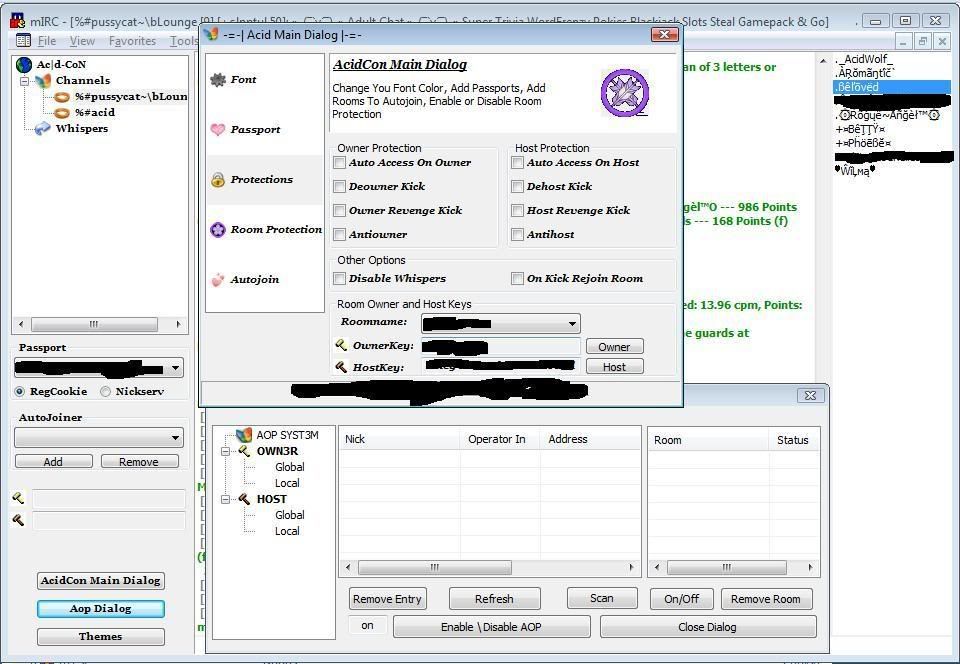
:oops: Hi just thought of posting the screenshot of my sparkpea chat script am currently working on using my own acidcon connection ;) hope u like it ;)acidcon.jpg

looking good acidwolf :)

Get information about ircWx here