Skip to content
General IRCd

Need Help With Code

A TG007 community discussion started by Warrior124.

Discussion 15 posts
Page 1 of 1
Open
Topic #14964 · 15 published posts · 4,502 views

I've been away from scripting for awhile, and am needing help with something. I am trying to code my dialog to color text in one line of my list window. The code I tried to use is...


did -i $dname 1 2 settxt $rgb(255,255,255)

...however, instead of coloring the text it adds a line with this code in it. I'm using mdx.dll for my dialog as well as views.mdx. I've got it marking the dialog on init as well as the SetControlMDX as well. Is there anything I can do to make it do what I want? Thanks, everyone.


on *:DIALOG:MT:*:*: {
  if ($devent == init) {
    dll $ff(mdx.dll) SetMircVersion $version
    dll $ff(mdx.dll) MarkDialog $dname
    dll $ff(mdx.dll) SetControlMDX $dname 1,5,8 ListView report grid showsel single rowselect flatsb labeltip stateclick > $ff(views.mdx)
    did -ra $dname 6 $chr(34)
    dll $ff(mdx.dll) SetControlMDX $dname 6 ProgressBar smooth > $ff(ctl_gen.mdx)
    dll $ff(mdx.dll) SetControlMDX $dname 7,8 scrollbar vertical > $ff(ctl_gen.mdx)
    .dll $ff(hos.dll) RemoveTheme $dname 6
    .did -a $dname 6 BarColor $rgb(113,145,187)
    .did -a $dname 6 BGColor $rgb(255,255,255)
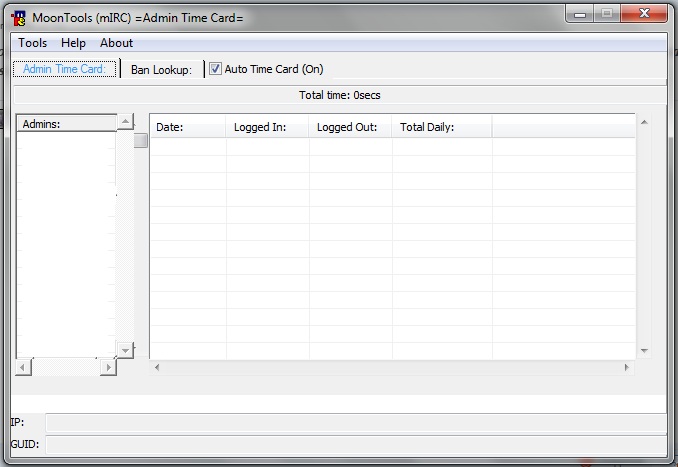
    .did -i $dname 1 1 headerdims  100:500
    .did -i $dname 1 1 headertext Admins:
    .did -i $dname 5 1 headerdims  75:500 83:500 83:500 100:500
    .did -i $dname 5 1 headertext Date: $chr(9) Logged In: $chr(9) Logged Out: $chr(9) Total Daily:
    .did -ra mt 7,8 0 1 100 1 1 1
  }
}

settxt <attrib> [RGB value]


Sets the text color. <attrib> can be:


color Sets the text foreground color

bgcolor Sets the text background color


Examples:


//did -i myDlg 20 1 settxt color $rgb(255,0,0)


//did -i myDlg 20 1 settxt bgcolor none

Thanks, Travis. However, what I'm looking for is a way to set text color for one line, and not all lines. Such as setting a text color for line 5 in listbox 1, and maybe later on for line 6 in listbox 1.

first dump mdx and hos and get dcx

Get information about ircWx here

first dump mdx and hos and get dcx


Wanted to say that, but didn't. Was hoping someone had a solution :P

Stupidity is a metric of success.

But what challenge would that be for you all? :P

Thanks, Travis. However, what I'm looking for is a way to set text color for one line, and not all lines. Such as setting a text color for line 5 in listbox 1, and maybe later on for line 6 in listbox 1.


Look closely and check the syntax.


Your line: did -i $dname 1 2 settxt $rgb(255,255,255)


Example in mdx help file: did -i myDlg 20 1 settxt color $rgb(255,0,0)

Yes, but as stated that code...


did -i myDlg 20 1 settxt color $rgb(255,0,0) 

colors the text in all lines. I don't want all lines of text colored. Just one particular line. For example...

Test1

Test2

Test3

Test4

Test5

Test6

Test7


...above is portraying a list of text. The text at line 3 is colored red while the text at line 4 is colored blue. The rest of the text is plain. That code above colors all lines of text. Not just one, or two. I need a code that doesn't color all lines. Just the lines I specify. I don't know if mdx can do this, but if not is there a dll out there that can in conjunction with mdx? If I have to use dcx that means an entire rewrite of my script which I would rather not do, because I have already spent alot of time on what I am doing, now. Thanks again, Travis. :)

Edited Mar 24, 2011 3:39 PM by Warrior124

It has been a very long time since I even used MDX but i think that is going to be a limitation of using that particular dll.


Now you are correct when you say you will have to do a lot of work to switch to DCX but I promise you that it's worth it. What you can do with dcx compared to mdx is like the difference in night and day.


Some other pros.


DCX is updated to work with mIRC 7*

DCX is still being actively worked on

DCX eliminates the need for a lot of other dlls like hos, ktools, etc


As I'm sure many of the users here that switched can tell you the extra work in the beginning is worth it in the end.

Edited Mar 24, 2011 10:03 PM by err0r

Get information about ircWx here

I've never scripted for DCX before, but I may give it a try in a future project. Maybe even rescripting what I'm working on. I wonder if DCX can do what I'm looking for? Thanks for the info, Mike.

it absolutely can do what u want


Posted Image

Edited Mar 24, 2011 10:44 PM by err0r

Get information about ircWx here

Awesome!! I'll give it a try. Thanks again, Mike.

did -i myDlg 20 1 settxt color $rgb(255,0,0)


Well line 1 is the control line so I would think that this would set the color for all the text in the control. I had hoped that you could just add the color command to your line.


did -i $dname 1 2 settxt color $rgb(255,255,255)


Does this not color line 2 only of the control id 1?

I tried a code like that, but it only inserts a new line with that text in it. It doesn't color for some reason.

Edited Mar 25, 2011 7:01 PM by Warrior124