Add-ons
Install and manage normal mIRC Remote scripts without giving up standard mIRC scripting, with an optional IRCWX-aware API for deeper integrations.
What is an add-on?
An ircWx-Conn add-on is still a normal mIRC Remote script. ircWx-Conn does not force developers into a proprietary scripting language. Standard .mrc scripts, Alt+R, /load, /unload, aliases, events, menus, variables, timers, hashes, sockets and dialogs continue to work.
addons\ folder is user-owned. Core updates and Factory Reset do not own or wipe your third-party add-on files.Add-on Manager
Open Tools → Add-ons → Add-on Manager.... The manager recursively discovers .mrc scripts under the addons\ folder and gives you convenient Load, Unload and Reload buttons.
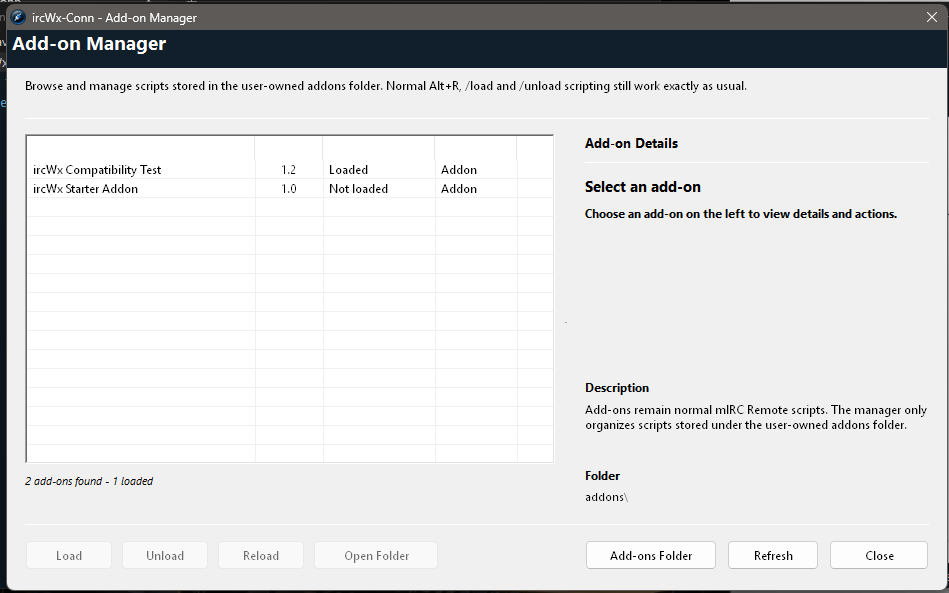
- Put the add-on's folder or
.mrcfile underaddons\. - Open Add-on Manager and choose Refresh if needed.
- Select the add-on.
- Choose Load.
Unload removes it from the current mIRC Remote load list. Reload is useful after editing an add-on.
Optional addon.ini
An add-on can include an optional addon.ini file to provide friendly metadata such as name, version, author, description, entry file and minimum public API version. It is not required for an ordinary mIRC script to work.
[addon]
name=My Add-on
version=1.0
author=Your Name
description=Example IRCWX-aware add-on
entry=my-addon.mrc
api=1
Normal mIRC loading still works
You can still use mIRC's own Remote editor and commands:
/load -rs addons\MyAddon\my-addon.mrc
/unload -rs addons\MyAddon\my-addon.mrc
A manually loaded script outside addons\ is still normal mIRC. The Add-on Manager is a convenience layer, not a requirement.
Public IRCWX Add-on API
When an add-on needs IRCWX-specific behavior, API version 1 provides stable helpers without depending on internal queues or socket names.
| Helper | Purpose |
|---|---|
$ircwx.api.version | Return the public API version. |
$ircwx.plain(text) | Return parser-friendly message text without IRCWX style wrappers/mIRC formatting. |
$ircwx.room.raw(room) | Convert a friendly room name to IRCWX wire form. |
$ircwx.room.display(room) | Convert wire form back to a friendly room name. |
$ircwx.rank(room,nick) | Return the primary IRCWX room rank. |
$ircwx.status.has(...) | Test an independent status bit such as Voice. |
$ircwx.canmanage(...) | Check local IRCWX room-management authority. |
ircwx.say, ircwx.notice, ircwx.whisper | Use IRCWX-aware outbound semantics and pacing. |
ircwx.join, ircwx.part | Use the shared navigation/JOIN pacing lane. |
ircwx.mode, ircwx.kick, ircwx.access, ircwx.prop | Use the room-management paths. |
Developer rules that keep add-ons safe
- Give your add-on its own alias/global/hash/timer/socket namespace.
- Do not put permanent custom aliases in updater-owned
aliases.ini. - Use public API wrappers for IRCWX-specific semantics or automated burst traffic.
- Do not depend on internal queue/hash/socket names; they can change.
- An add-on may define normal
menu channelblocks without central registration.
Advanced: optional central Add-ons menu launcher
A manifested add-on can advertise one friendly launcher:
[menu]
label=My Add-on...
alias=myaddon.open
The alias must exist in the loaded script. The manager does not execute arbitrary command text from the manifest.