Room Management
Understand IRCWX room ranks, modes, access entries, room properties, kicks and bans without needing to memorize the wire protocol.
Who can manage a room?
Room-management controls appear or become enabled according to your IRCWX rank. In current ircWx-Conn behavior, the primary management ranks are SuperOwner, Owner and Host. HelpOp and Voice are useful statuses but do not automatically receive the same management authority.
| Status | Mode | Typical role |
|---|---|---|
| SuperOwner | +Q | Highest room ownership status. |
| Owner | +q | Room owner/manager. |
| Host | +o | Room host/manager. |
| HelpOp | +h | Helper status. |
| Voice | +v | Voice/speaking status; may coexist with a higher rank. |
| Participant | none | Normal room participant. |
Room Modes strip
Open Channel Modes from the room menu to show the compact room-management strip. Buttons reflect the current state and are enabled only when your rank can manage the room.

The editable room modes are Invite Only, Profanity Filter, Room Key, Room Limit, Moderated, Private, Topic Locked, Room Knock, Room Whispers Off, Join Flood Protection and No Guest Whispers.
+l number. It is a value-setting operation rather than a simple on/off button.Room properties
Management shortcuts can set IRCWX room properties such as:
- Topic — the room topic.
- OnJoin Message — a message shown when someone enters.
- Owner Key — key used for owner-level entry/identification.
- Host Key — key used for host-level entry/identification.
Change a user's room status
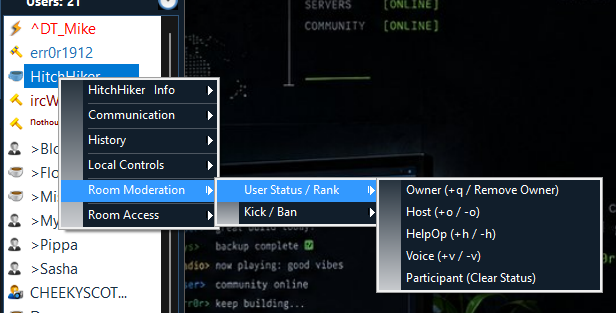
Right-click a nickname and open Room Moderation → User Status / Rank. ircWx-Conn only enables changes that the current IRCWX authority model permits for that target.
Available actions can include Owner, Host, HelpOp, Voice and Participant/Clear Status.
Kick and ban
The nickname menu provides a safer front end for common moderation:
- Kick — removes the selected user from the room.
- Kick with Reason — asks for a reason first.
- Ban + Kick — adds a deny entry and removes the user.
- Timed Ban — preset durations from minutes to 24 hours.
- No Limit — a non-expiring deny entry.
Room Access
Open Room Access from the room menu to view and manage IRCWX access entries. Depending on your authority, access types can include Owner, Host, Voice, Grant and Deny.
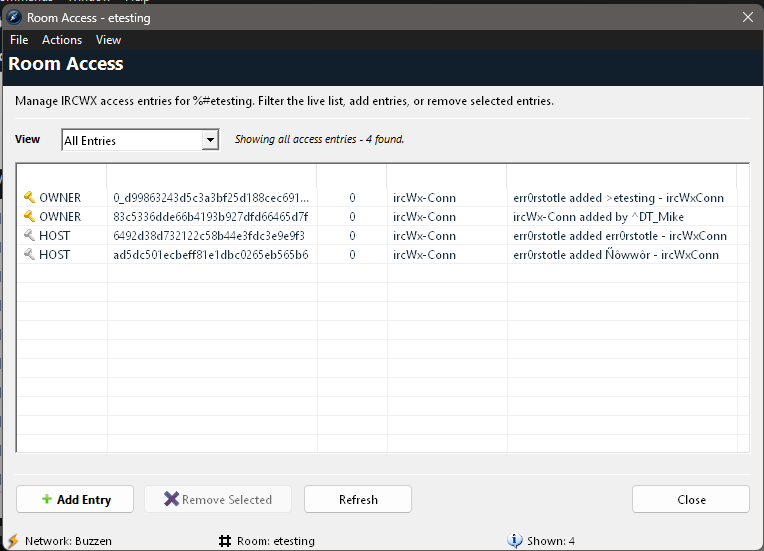
Use the import/export features carefully. Access-list changes affect the room on the server, not just your local client.
Server-controlled flags
Advanced: not every mode is user-editable
ircWx-Conn deliberately limits its room-mode controls to the current IRCWX/V5 user-changeable set. Special/server flags such as +r, +R and +x can exist as room state but are not exposed as generic toggle buttons. This prevents a user interface click from accidentally emitting an unsupported mode change.