Skip to content
TG007 File Database

Information Addons

mIRC addons that deal with information ( sockread, etc. )

File Database Information Addons
44 files in this category
Advertisement
Archive results

Information Addons

Page 4 of 5

Sep 30, 2008 1,260 downloads

Google Definer

By Zmodem

Google Definer is a very primitive snippet that allows you to load the definition for words, from google, into a custom dialog. Syntax: /gdef I only say that it's primitive because it's completely command-line…

Jul 14, 2008 1,300 downloads

Urban Dictionary Search

By EL

syntax: !UrbanS word definition or example definition number EXP: !UrbanS Napa Definition 4 or !UrbanS Napa Example 4.yeah you can pick either or and like the other script it tracks how many times that word ha…

Jul 8, 2008 1,328 downloads

YouTube Video Searcher

By MountainDew

This script searches for videos on YouTube and returns the first three results. It returns the Title, Date Added, User, Length, Views, Rating, and URL for each video. Syntax: [!YouTube | /YouTube] [Search Crit…

Jul 7, 2008 1,728 downloads

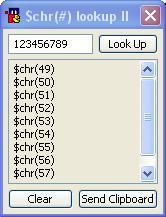
$chr(#) search Dialog II

By Scakk · Version II

This dialog will allow you to get the $chr(#) for anything you enter into the edit box. It will also allow you to add it to the clipboard for ease of use.

Jun 25, 2008 565 downloads

Bible Script

By krizoek

This is a script that allows one to choose to work as a bot, one can easily add and remove channel with a window dialog. There are lots of functions, like changing the verseinformation position. And one may al…

Jun 15, 2008 406 downloads

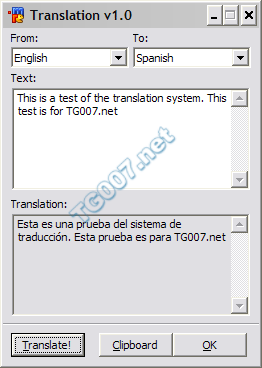
Translate v1.0

By entropy · Version 1.0

A very nice dialog used to translate text from one language to another one. Uses google's translation engine. Has the option to copy results to your clipboard with the click of a button. A very handy tool.

Jun 5, 2008 1,466 downloads

AgeBot

By Gummo · Version n/a

This script lets you use menus to change the active room(s) and remember the users' ages. The script only allows people between the ages of 18 and 50. To use this, press alt+r to open the remotes tab, then go…

Advertisement