ircWx-Conn Help Guide
A beginner-friendly guide to ircWx-Conn with deeper technical information when you want it.
Start with the basics
Set up your connection, join a room, send a message and learn the handful of controls you will use every day.
Find the feature
Use the search box above or the guide navigation to jump directly to rooms, whispers, appearance, updates, add-ons and more.
Go deeper
Advanced sections explain IRCWX room names, ranks, flood pacing, the local connection proxy and the public add-on API.
What is ircWx-Conn?
ircWx-Conn is an mIRC-based client built specifically for IRCWX networks. It adds modern dialogs, IRCWX-aware room and whisper handling, room management tools, a Webchat-style view, appearance controls, add-on support, updates and other conveniences without taking away normal mIRC scripting.
Almost everything a normal user needs is available from the toolbar, room menus and the main Status menu. Commands are there when you want them.
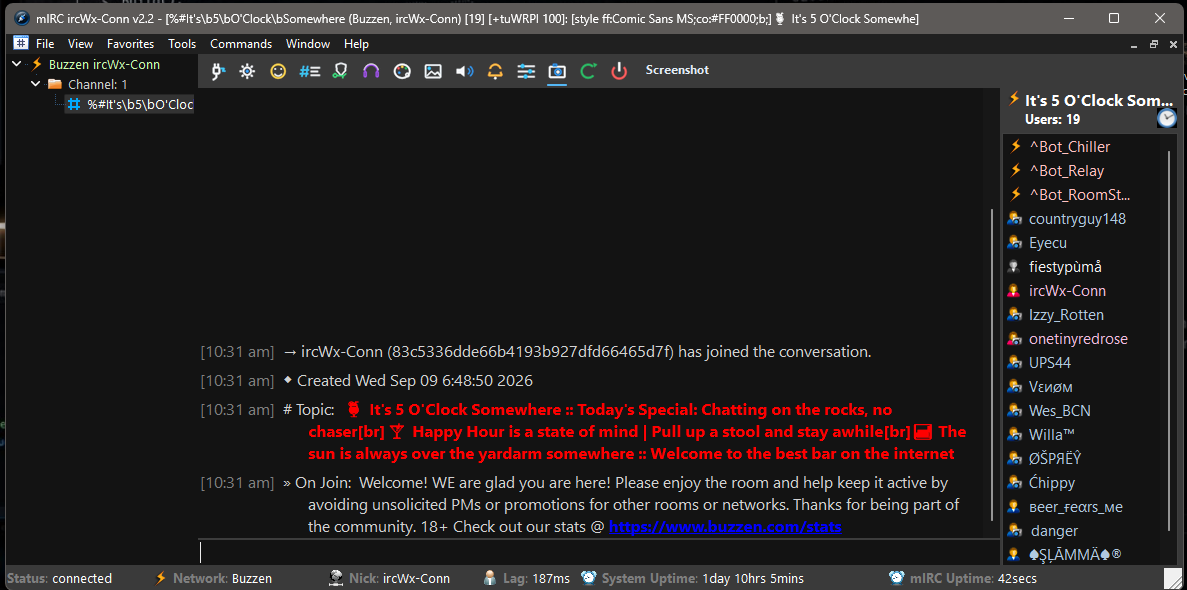
The five-minute start
- Open Getting Started. On a fresh install it opens automatically when setup is needed. You can also right-click Status and choose Getting Started....
- Set up your connection. Choose your network and sign in with your account, or use guest mode when the selected network allows it.
- Connect. Use the toolbar or right-click Status → Connection.
- Browse or join a room. Use Status → Rooms → Browse Rooms... or Join a Room....
- Chat. Type in the message box at the bottom of the room and press Enter.
Popular guide topics
Beginner first, advanced when useful
This guide is deliberately layered. The normal instructions explain what to click and what you should expect. More technical information is tucked into expandable Advanced sections so it is available without overwhelming a new user.
Advanced: how ircWx-Conn fits with mIRC
ircWx-Conn extends normal mIRC rather than replacing it. Standard Remote scripts, Alt+R, aliases, variables, users, timers, hash tables, dialogs and normal events continue to work. IRCWX-specific features add protocol-aware helpers where ordinary IRC behavior is not enough.